





How to create a football alert bot: criteria
9 min readA bot looks for the matches that meet the conditions you set and sends you an alert. See how to choose the scenario, the conditions and the leagues, in 5 steps.
An alert bot looks through the day's matches for the ones that meet the conditions you set and sends you an alert when it finds one. To create one that works, start with the match scenario you want to find and only then choose the conditions, the competitions and the minutes.
In this guide you will see the 5 steps for creating a bot on CornerPro, which conditions are available and an example of a corners bot applied to real Liga Portugal matches.
What is a football alert bot?
It is an automatic filter that follows the matches for you. You set the conditions, for example "home team with lots of dangerous attacks between minutes 30 and 40", and the bot lets you know whenever a match meets them. There are more than 100 criteria: live match stats, team history, odds, xG, L15 and competitions.
The bot does not decide anything. It finds the matches; the reading is still yours.
Before the criteria: what match scenario do you want to find
This is the most important question, and the one most people skip. "A corners bot" or "a goals bot" is not a scenario. A scenario describes a behaviour within the match:
- A favourite that is losing or drawing and starts to put on pressure.
- An open match, with both teams attacking and shooting.
- A home team that dominates the last few minutes, whatever the score.
All three can serve the same market, but each one calls for different conditions. In the first, the score and the pre-match odds matter. In the third, the score may not even matter; what counts is the team's recent behaviour.
The market also changes the bot. A bot for the first half has different conditions from a bot for the full match, and a goals bot does not use the same conditions as a corners bot.
The 5 steps to create the bot
The builder takes you through 5 steps. In the first four, the Your bot panel on the right keeps showing what you have already chosen.
- Market. What you want to happen after the alert: goals, corners, cards, result (1x2) or races, and the line (for example Over 0.5HT or Over limit FT).
- Minutes. During the match, you choose the window of minutes in which the bot searches. Before the match, you choose between One alert per match and One list a day, at the time you want.
- Conditions. What the match has to meet: the stats, the score at the moment of the alert, and the competitions and teams. The bot needs at least 3 conditions and only sends the alert when all of them are met.
- Alert. What goes in the message (condition values, links, live stats), when not to send it and a message of your own. All of this is optional.
- Review and create. The name is built from your choices and you can type over it. Under This is how the alert arrives you see an example of the message before you click Create bot.
The full step-by-step, with images of every screen, is in the tutorial How to create a bot in the new builder: the 5 steps.
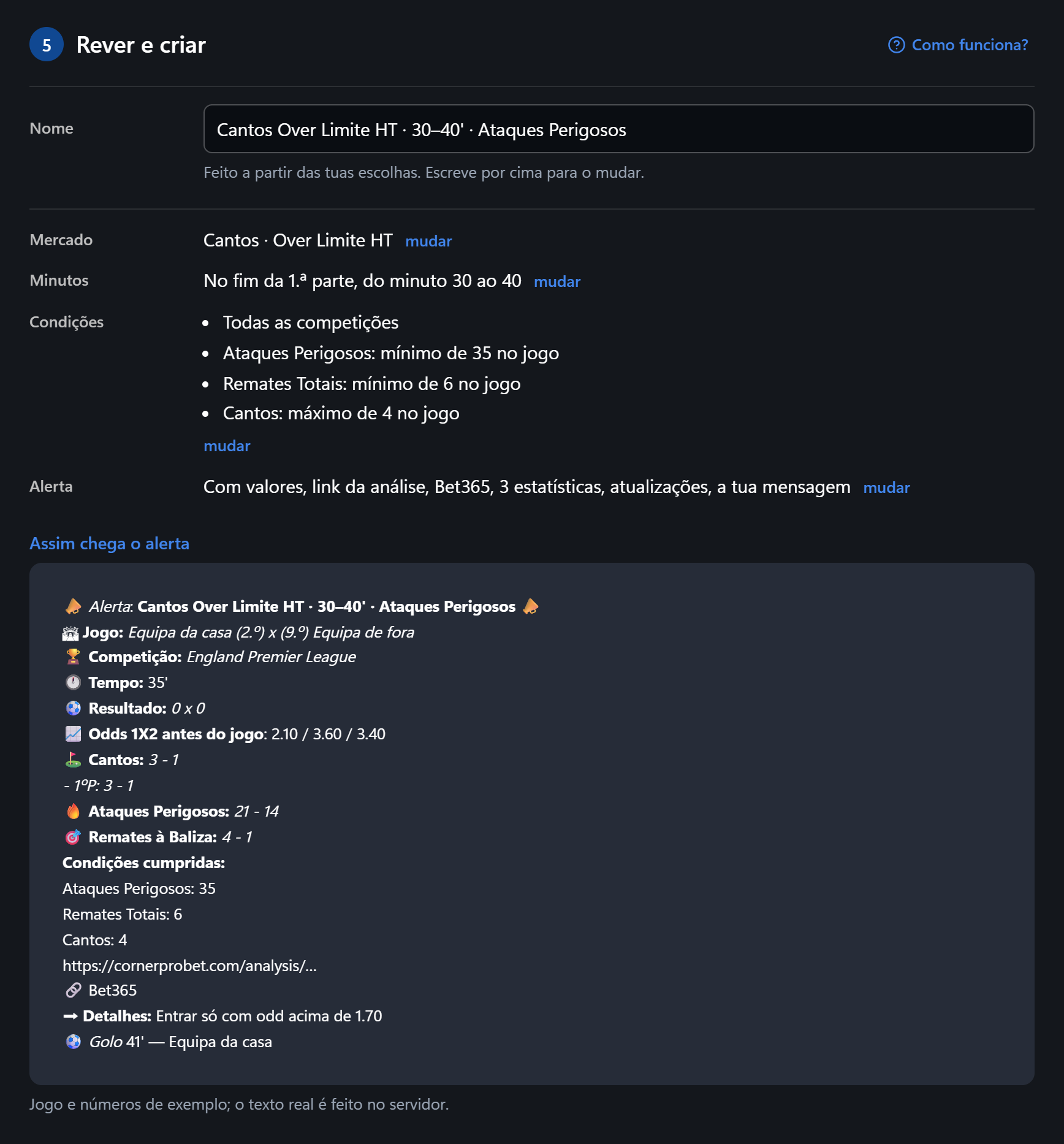
Which criteria to use (live, history, odds)
In step 3, under Choose stat, the catalogue is split into three tabs (in Before the match bots the first one does not appear):
- In the match, live: what is happening right now. Goals and xG, Pressure and attacks (Pressure Index, attacks, dangerous attacks, possession), Shots (on target, off target, inside and outside the box), Corners and crosses, Cards and fouls, and Heat map. You can compare the two teams (home with more than away, favourite with more than the underdog) and count only one part of the match.
- Team history: data from previous matches, in Goals, Corners and Cards. All three have the site's predictions in % and the averages. Goals and corners also have the values by period of the match (for corners: 0-10, 11-20, 21-30, 31-36, 37-45, 46-50, 51-60, 61-70, 71-75, 76-80, 81-86, 75-90, 80-90 and 87-90) and, for corners, the races. You choose which team it applies to and which matches count: the last 6, 8, 10 or 15, home / away or all, and only those in this competition, if you want.
- Odds and competition: pre-match and live odds (including the goals and corners lines), league position, matchday, Form, the two-leg aggregate and more.
Outside the catalogue are the Score at the moment of the alert (0-0, draw, favourite winning…) and the Competitions and teams.
More conditions do not make a better bot. Every extra condition cuts matches; choose the ones that describe the scenario, not all the ones that look good.
Corners bot: example
Scenario: the home team pressing down the flanks late in the first half, against an away side that concedes a lot of corners on the road.
- Market: Corners, Over limit HT.
- Minutes: During the match, from minute 30 to 40 (End of the first half).
- Team history: in the Corners · By period of the match category, the 37-45 column and the For row, for the home team, above a minimum (it usually wins corners in that period).
- In the match, live: Pressure Index with Home has more than away; Heat map — left side or right side of the home team above a minimum.
- Competitions and teams: Only these, with the competitions you follow.
Two matchday 7 games in which this scenario came up:
- Alverca vs Rio Ave (19/09). At the time, Rio Ave were one of the teams conceding the most corners away from home (6.8 per match). At 36 minutes, Alverca led 1-0 and had 17 dangerous attacks to 4 and 4 shots on target to 1. Corners were 2-2. Between minute 37 and half-time, Alverca won one more, at 45+1.
- Estrela da Amadora vs Académico de Viseu (20/09). Here the home team were losing, 0-2 since minute 24. At 36, Estrela had 14 dangerous attacks to 3, and Académico were conceding 6.5 corners per match away. The 37HT corner also came at 45+1.
Two matches do not prove a bot. That is what the next step is for.
How to test the bot before using it (Time Machine)
The Time Machine runs the bot on matches that have already been played. After you create the bot, the builder shows the Test in the Time Machine button; there, under New Analysis, the bot is already selected. You get a report with the history: in how many matches the bot would have alerted and what happened in each one.
Use the report to fine-tune. If the bot alerts in almost every match, the conditions are too loose. If it almost never alerts, they are too tight. And a setup that works in one league may not work in another: the averages for goals, corners and tempo vary a lot between leagues. Liga Portugal 2026/27 has 8.90 corners per match (98 matches, up to 11/11/2026) and the Brasileirão 2026 has 10.57 (339 matches, up to the same date). Check each competition's data before applying the same bot to several.
Telegram bot: how the alerts arrive
The alerts arrive in the Bot chat in the CornerPro app, where they are all kept together, and on Telegram, if you connect your account under Add Bot to Telegram, at the top of the Bot page. You can use both: the alert arrives in both places, always with the link to the match analysis.
If you want to stop receiving a bot's alerts for a while, turn it off with the switch in the My Bots list and turn it back on whenever you want. You do not need to delete it.
Frequently asked questions
Do more conditions make the bot better? No. The bot only alerts when all of them are met; extra conditions only cut matches. Use the ones that describe the scenario. The minimum is 3.
Does the same bot work for every league? Rarely. Each league has its own tempo. Test it in the Time Machine and narrow down the competitions.
My bot did not alert on a match. Why? In the My Bots list, open the bot's ⋮ menu and choose Why no alert?. For that match, you see which conditions failed and the value the match had for each one.
What is the difference between a list and an alert in pre-match bots? One list a day sends all the matches that meet the conditions at the time you choose. One alert per match notifies you before each match.
Are there ready-made bots? Yes, on the corners bots page and in the Bot Marketplace. It is worth seeing how they were built before you create yours. And, in step 1 of the builder, Quick setup has four examples that fill in the steps for you, so you do not start from scratch.
Test a bot in the Time Machine
Related tutorials
You are going to create an alert bot. Where should you start?
Answer to mark this tutorial as done.