





How to create a bot in the new builder: the 5 steps
3 min readMarket, Minutes, Conditions, Alert and Review and create: what you choose at each step, where the conditions are and an example corners bot.
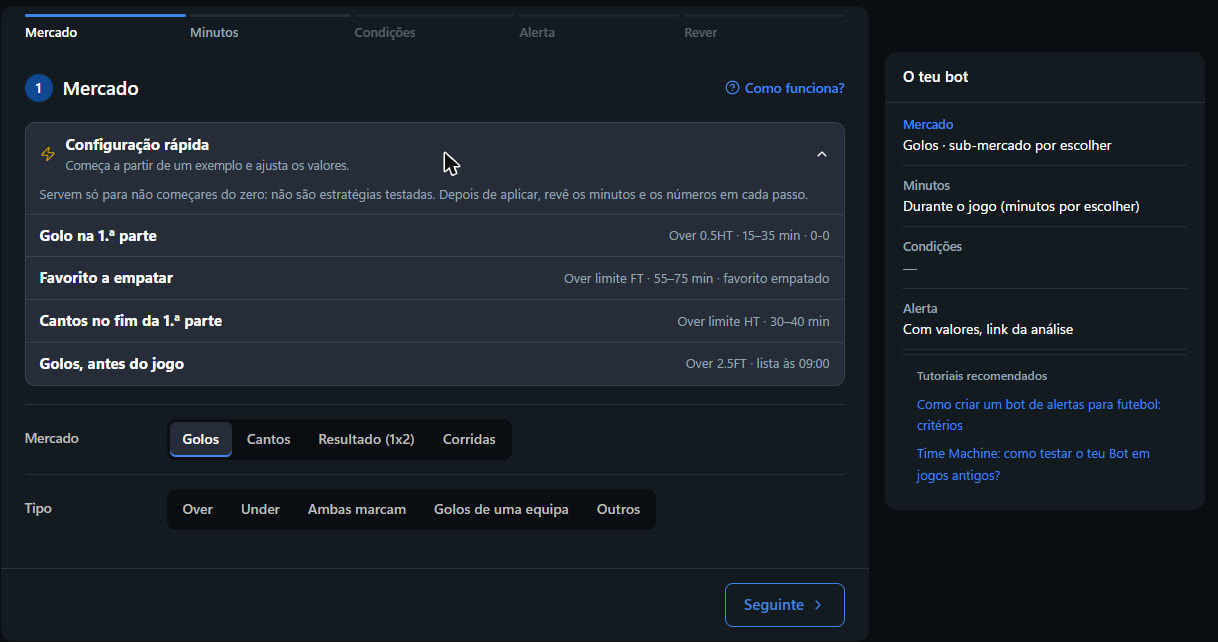
You create a bot in 5 steps, in this order: Market → Minutes → Conditions → Alert → Review and create. On the right, the Your bot panel shows what you have chosen so far.
The 5 steps
- Market. Choose what you want to happen after the alert: goals, corners, result (1x2) or races, and the line (for example Over 0.5HT or Over Limit FT).
- Minutes. Under During the match, choose the window in which the bot searches, up to 20 minutes (for example End of the first half, 30–40'). Under Before the match, choose One alert per match or One list a day.
- Conditions. Say what the match has to meet: the score at the moment of the alert, the competitions and the stats. You need at least 3, and the bar at the top shows how many you already have.
- Alert. Choose what goes in the message (values, links, stats) and when not to send (quiet hours, Betfair matches only). It is all optional.
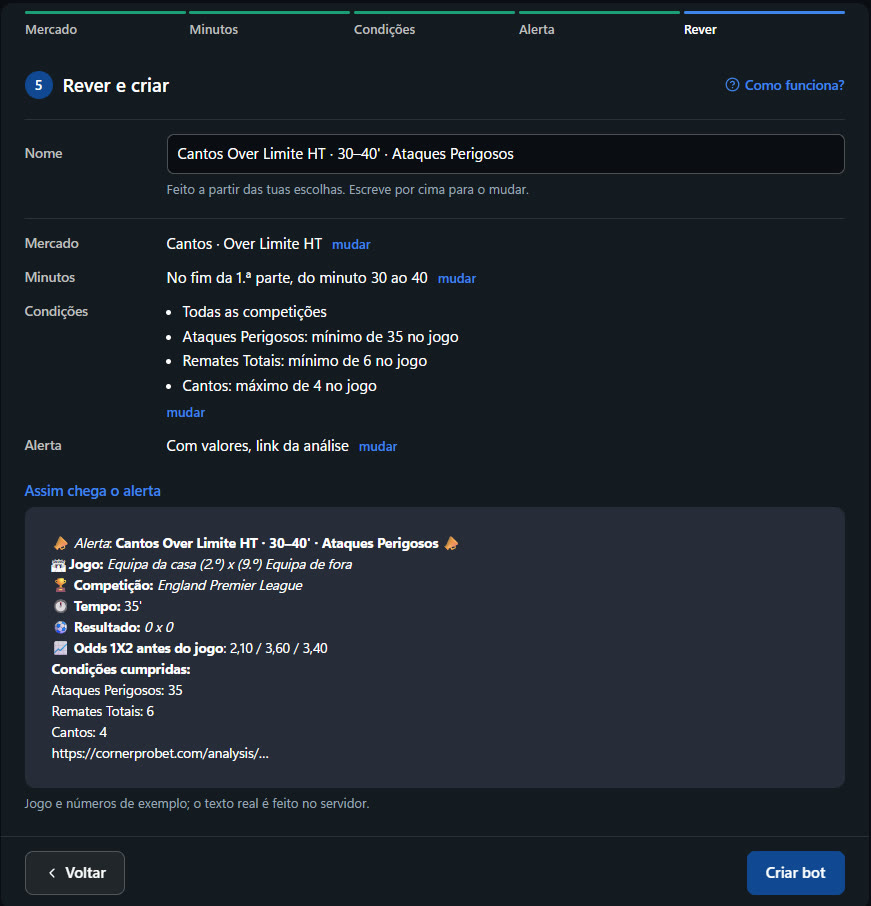
- Review and create. Confirm the name, which you can type over, check the sample message under This is how the alert arrives and click Create bot.
Tip
Not sure where to start? In step 1, open Quick setup: four examples that fill in the steps for you. They save you starting from scratch; they are not tested strategies.
Where the conditions are
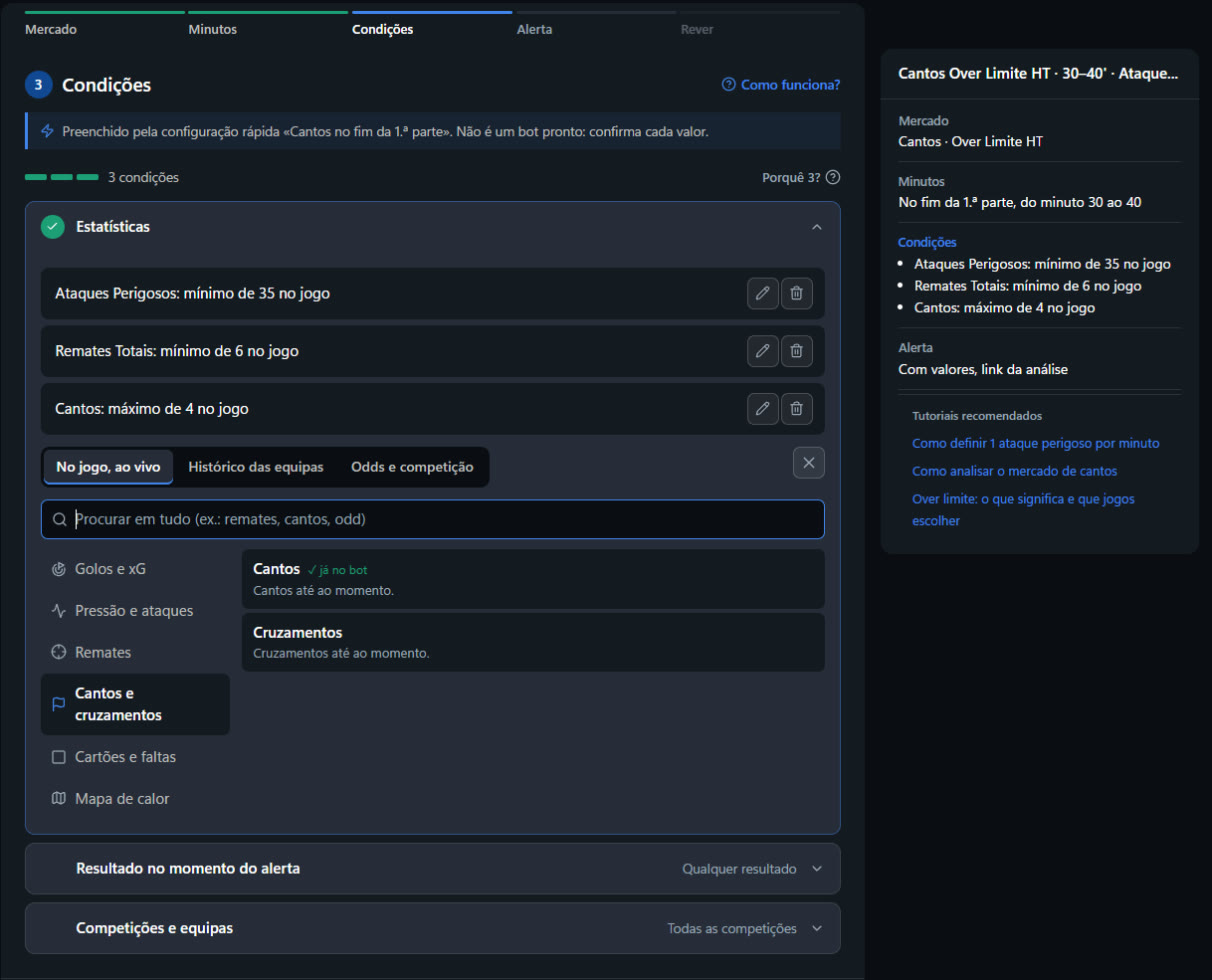
In step 3, click Choose stat. The catalogue is split into three and has a search box (type "shots", "corners" or "odds"):
- In the match, live: Goals and xG, Pressure and attacks, Shots, Corners and crosses, Cards and fouls, Heat map.
- Team history: goals, corners and cards from recent matches, the site's predictions in %, averages and values by period of the match.
- Odds and competition: pre-match and live odds, league position, Form, the two-leg aggregate and more.
Outside the catalogue are the Score at the moment of the alert (0-0, draw, favourite winning…) and Competitions and teams. What counts towards the 3 conditions is explained in The 3-conditions rule.
Example: a corners bot at the end of the first half
- Market: Corners › Over › Limit › Over Limit HT. It is the Corners at the end of the first half example in Quick setup.
- Minutes: End of the first half, from minute 30 to 40.
- Conditions: Dangerous Attacks, minimum of 35 in the match; Total Shots, minimum of 6; Corners, maximum of 4 (so the line is still low).
- Alert: with the values and the analysis link.
- Review and create: the name fills itself in, "Corners Over Limit HT · 30–40' · Dangerous Attacks".
The numbers in the example are a starting point. Adjust them to your scenario and the competitions you follow.
After you create it
- To receive the alerts, turn on the bot chat in the app: that is where the alerts arrive, on your phone. If you prefer Telegram, connect it with Add Bot to Telegram, at the top of the Bot page.
- If the bot did not alert on a match, open the bot's ⋮ menu and choose Why didn't it alert?: you see which conditions failed and the value the match had.
- If you leave halfway, the bot is saved as a draft. Next time you will see You have an unfinished bot, with Recover or Discard.
- Old bots open in the new builder with Edit. Anything that cannot be edited there yet shows as "as it was saved" and stays the same when you save.
Try it now: open the Bot page and click Create bot
You are creating a bot in the new builder and want more relevant alerts. What is the best approach to the conditions?
Answer to mark this tutorial as done.